

Dockets have always been settled twice. Once on site, where the work actually happens, and again days later at a desk chasing paper, matching quantities to orders, and arguing about a wet hire hour nobody can remember.
The new head contractor docket management experience in the Docketbook app closes that gap. Supervisors and engineers can now review, accept, file and register dockets from the phone in their pocket, at the point the work is done. One record. Everyone in agreement. Done
What's new
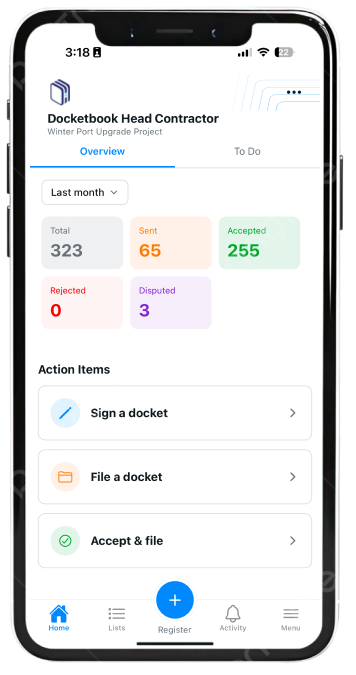
A To Do list that tells you what needs doing. Open the app and the home screen shows your project's docket position for the month - total, sent, accepted, rejected and disputed. The To Do tab turns that into action items: dockets to sign, dockets to file, and dockets to accept and file. No hunting through a register to work out what's outstanding.
 Accept and file in one motion. Open a docket and you see the supplier, order number, customer reference, line items and hours. Accept it, then file it and swipe straight through to the next one. A stack of ten plant hire dockets is a two-minute job at the end of shift.
Quick filing against your cost codes. When you file, Docketbook offers your most recent filing configurations, including split allocations like Earthworks 50% / Labour 50%, or a percentage split across two bridge headstocks. Cost coding happens at the moment of acceptance, by the person who knows what the plant was actually doing, instead of weeks later by someone guessing.
AI scanning for paper dockets. Suppliers who haven't come across yet still hand over paper. Tap Register, choose Scan Docket, and photograph it - the AI scanner reads the docket and fills the fields for you. Review the times and details, then Register, Register & Assign, or Accept & File on the spot. Every docket on the project ends up in one register, digital or not.
Filters that match how you work. Filter your To Do list and the full register by status, date range, supplier, custom fields, or just the dockets assigned to you. The Activity feed shows who sent, accepted or disputed what, and when.
Why it matters for head contractors
- Approve at the point of truth. The person who saw the excavator on site is the person accepting the docket — not an admin reconciling a PDF a fortnight later.
- Fewer disputes, faster claims. Dockets accepted and coded on the day give you clean cost data when the subcontractor's claim arrives.
- No paper backlog. Scanning brings non-digital suppliers into the same register, so month-end isn't an archaeology exercise.
- Real project visibility. Live status across every supplier on the job, in a view your site team will actually keep up to date.
Cost control on a project is decided in the field, one docket at a time. This release puts that control where it belongs.
Watch the walkthrough to see it in action, or contact support@docketbook.com.au to get your site team set up.


